Table of contents
Why Cloudflare for WordPress
Cloudflare gives you a global CDN, WAF, DDoS protection, image optimisation, and analytics, even on the free plan. For businesses in the US, UK, Canada and Australia serving international customers, that is transformative.
Baseline setup
- Proxy (orange cloud) every relevant DNS record.
- Enable HTTP/3, 0-RTT, TLS 1.3, and Brotli.
- Set SSL mode to Full (Strict) with an origin certificate.
Cache rules
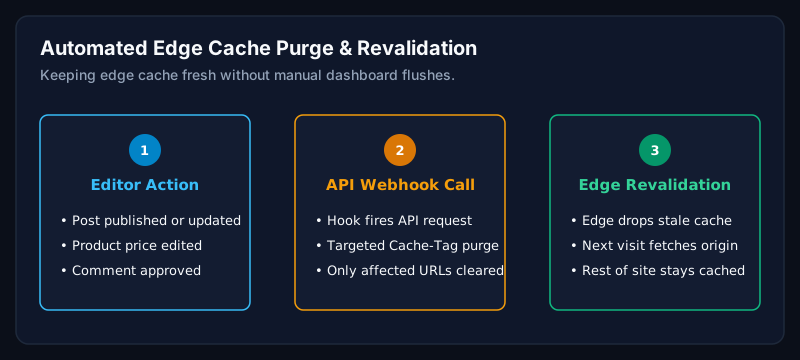
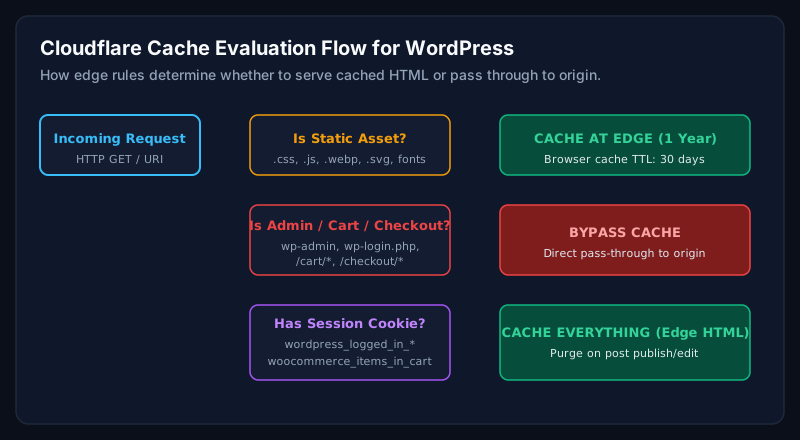
- Cache static assets (images, CSS, JS, fonts) for 1 year at the edge.
- Cache full HTML for anonymous users with a bypass on /wp-admin/, /wp-login.php, WooCommerce cart, checkout, and my-account.
- Bypass cache when specific cookies exist (wordpress_logged_in, woocommerce_items_in_cart).
WAF & security rules
- Enable OWASP + Cloudflare Managed Ruleset.
- Rate limit /wp-login.php to 5 requests per minute per IP.
- Block or challenge access to /xmlrpc.php.
WooCommerce specifics
- Never cache cart, checkout, or my-account pages.
- Cache product and category pages with cookie bypass.
- Use Cloudflare Images or Polish for product photography.
Common mistakes
- Enabling Rocket Loader on complex WordPress themes. It often breaks JavaScript.
- Caching HTML without a cookie bypass, causing logged-in users to see cached pages.
- Turning on Development Mode and forgetting about it.
When should businesses hire an expert?
Cloudflare misconfigurations can silently break checkout, forms, or analytics. If your site is revenue-critical, have a specialist review your setup at least once a year.
Frequently asked questions
Is Cloudflare free plan enough for WordPress?
For most small and mid-sized business sites, yes. Pro and Business plans add advanced WAF and image features that WooCommerce stores often benefit from.
Will Cloudflare break my WordPress site?
Not if configured correctly. Cache rules must bypass admin, login, cart, and checkout endpoints.
Do I still need a caching plugin?
Yes. Cloudflare complements a server-side caching plugin. It does not replace it.
Related Service
Need expert help with this?
Enterprise-grade Cloudflare CDN, APO, edge cache rules, and security configuration for WordPress.
Get a Website Speed Analysis
Want a Cloudflare setup tuned for your WordPress site?
Book a free speed analysis. I will review your Cloudflare configuration and hosting stack together.
Get a Website Speed AnalysisAuthor
Usman Shamas Jatoi
WordPress Performance Engineer · Technical SEO Consultant · Website Infrastructure Specialist
Usman Shamas Jatoi helps businesses across the US, UK, Canada and Australia build faster, safer, and higher-ranking WordPress websites. He specialises in Core Web Vitals, technical SEO, Cloudflare, WooCommerce performance, and long-term website maintenance.