Cloudflare Setup for WordPress
I configure Cloudflare to suit the WordPress site, hosting environment, and business requirements. The setup can cover DNS, SSL, caching, delivery, and suitable security controls without treating every site the same.
The problem
Default settings can be incomplete or unsafe for dynamic WordPress sites
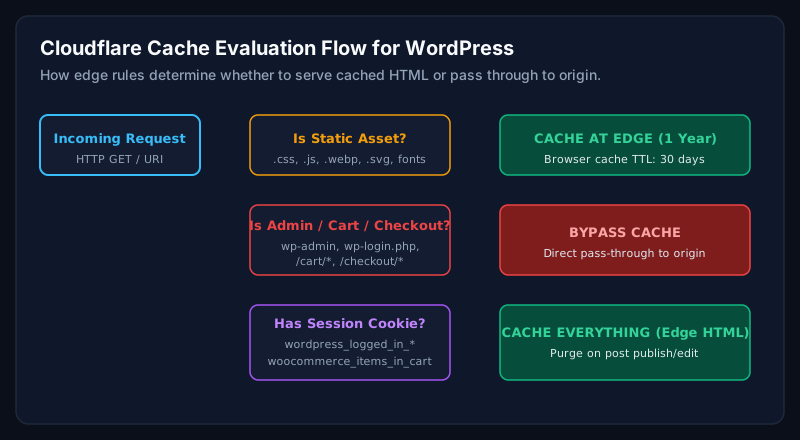
Poor DNS changes can interrupt access, broad caching can affect logged-in or checkout areas, and aggressive security rules can block legitimate visitors. Configuration needs to match how the website actually works.
What I review on a WordPress site
- Existing DNS records and nameserver plan
- SSL mode and origin certificate setup
- CDN and cache behaviour
- Dynamic, logged-in, cart, and checkout exceptions
- Suitable firewall and rate-limit rules
- Origin exposure and important third-party services
What you receive
- Documented Cloudflare configuration
- DNS and SSL checks
- Cache rules with necessary exceptions
- Agreed security controls
- Post-change testing of important pages and functions
- Notes for future changes and troubleshooting
Process
A clear process from review to handover
- 01
Map
Document DNS, hosting, SSL, dynamic areas, and services that depend on the domain.
- 02
Configure
Apply agreed delivery, caching, and security settings in a controlled order.
- 03
Test
Check public pages, admin access, forms, logged-in areas, and commerce functions where relevant.
- 04
Handover
Record the setup, exceptions, and practical guidance for future changes.
Frequently asked questions
Useful answers before we talk
If your situation is not covered, send the details and I will confirm whether I can help.
Discuss your website
Need help with cloudflare setup?
Book a call to discuss the problem, current setup, and the most useful next step.
Related services
Continue your review
WordPress Security
Reduced avoidable risk, stronger recovery readiness, and a clear plan for ongoing checks.
View serviceWordPress Speed Optimization
A faster, more efficient site with measured improvements and clear technical priorities.
View serviceHosting Optimization
A hosting setup better aligned with the site's workload and practical next steps.
View service