Table of contents
Why WooCommerce is different
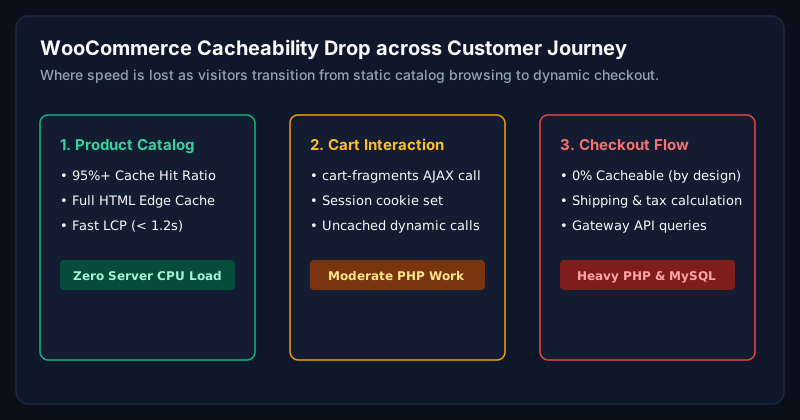
WooCommerce is not a static site. Cart, checkout, and my-account pages must stay dynamic per user, while product and category pages should be aggressively cached. Getting that split right is the entire game.
Hosting for WooCommerce
- LiteSpeed or Nginx with PHP-FPM 8.2+ and OPcache.
- Object cache (Redis), mandatory for stores over 500 products.
- Dedicated database resources; move analytics off the primary DB.
Caching strategy
- Full-page cache for anonymous product and category pages.
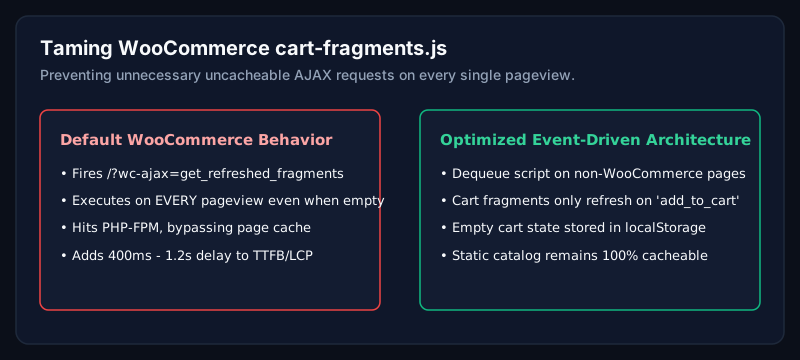
- Bypass on cart/checkout/my-account and when WooCommerce session cookies exist.
- Fragment caching for mini-cart if your theme supports AJAX.
Checkout speed
- Serve checkout over HTTP/3 with warm PHP workers.
- Remove non-essential JavaScript from the checkout template.
- Test with real international IPs, checkout speed varies dramatically by region.
Database tuning
- Prune expired transients, sessions, and old orders on a schedule.
- Add indexes to wp_postmeta and wp_options for slow queries.
- Split analytics or audit logs into a separate table or database.
Core Web Vitals for stores
Product images are almost always the LCP. Serve AVIF/WebP with correct sizes, preload the main product image, and never lazy-load it.
Common mistakes
- Caching cart/checkout pages by accident.
- Running 5+ marketing pixels synchronously on every page.
- Using a heavy multi-purpose theme for a store that sells 10 products.
When should businesses hire an expert?
If your store does more than £5k/month in revenue, WooCommerce performance work usually pays back within 30-60 days from recovered conversion alone.
Frequently asked questions
What is the fastest WooCommerce hosting?
For most stores, tuned LiteSpeed or Kinsta/WP Engine with Redis and PHP 8.2 delivers excellent results. The stack matters less than the tuning.
Can I cache WooCommerce with Cloudflare?
Yes, cache product and category pages, bypass cart/checkout/my-account, and bypass when WooCommerce cookies are present.
How fast should WooCommerce checkout load?
Under 2 seconds LCP on mobile in your primary market. Anything slower measurably hurts conversion.
Related Service
Need expert help with this?
High-performance custom WooCommerce development, cart optimization, and checkout scaling.
Request a Performance Review
Ready to make your WooCommerce store faster?
Request a performance review. I will audit your store and send back a prioritised speed plan.
Request a Performance ReviewAuthor
Usman Shamas Jatoi
WordPress Performance Engineer · Technical SEO Consultant · Website Infrastructure Specialist
Usman Shamas Jatoi helps businesses across the US, UK, Canada and Australia build faster, safer, and higher-ranking WordPress websites. He specialises in Core Web Vitals, technical SEO, Cloudflare, WooCommerce performance, and long-term website maintenance.