Table of contents
Why WordPress speed matters
Every 100ms of extra load time reduces conversion. For businesses in the US, UK, Canada and Australia running paid ads on a slow WordPress site, that is a direct tax on every click.
1. Hosting & TTFB

- Use a modern managed host or tuned VPS (LiteSpeed, Nginx, or Apache with PHP-FPM 8.2+).
- Target Time to First Byte (TTFB) under 400ms across the US, UK, Canada and Australia.
- Enable OPcache and object caching (Redis or Memcached) at the server level.
2. CDN & edge caching
Cloudflare is my default. Cache full HTML for anonymous users where possible, cache all static assets aggressively, and use Cloudflare Images or Polish for responsive delivery.
3. Full-page & object caching
- One caching plugin only. LiteSpeed Cache, WP Rocket, or FlyingPress.
- Enable object cache (Redis) for logged-in and dynamic pages.
- Preload the cache after publishing so the first visitor is not the tester.
4. Image pipeline
- Serve AVIF where supported, WebP as fallback.
- Generate correct responsive sizes and use srcset.
- Lazy-load below-the-fold images, never the LCP image.
5. CSS & JavaScript
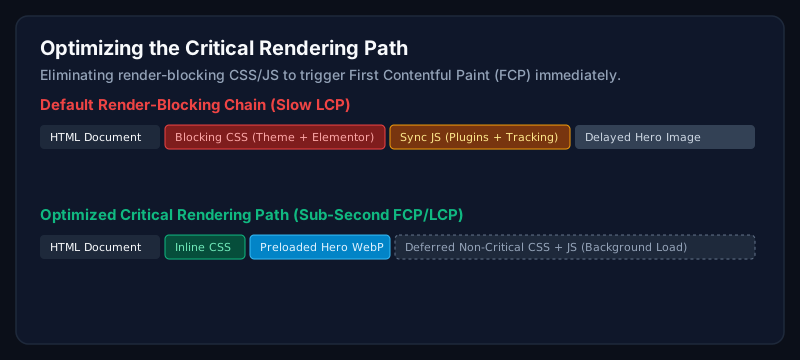
- Remove unused CSS per template (Critical CSS + async load).
- Defer non-critical JavaScript and delay third-party scripts.
- Self-host web fonts and preload the primary weight.
6. Database
- Remove auto-draft revisions, expired transients, and orphaned post meta monthly.
- Add indexes for slow queries surfaced by Query Monitor.
- Move analytics/logs off the primary database.
7. Plugins & themes
- Audit every plugin quarterly, keep only what earns its place.
- Replace heavy multi-purpose themes with lean, block-based themes where possible.
- Load plugin scripts only on pages where they are used.
Common mistakes
- Stacking multiple caching plugins.
- Optimising images to unreadable quality instead of switching format.
- Chasing Lighthouse scores while ignoring field data.
When should businesses hire an expert?
If your site is a lead-generation or e-commerce engine and TTFB, LCP, or INP have been failing for months, an expert typically pays for themselves in the first 30 days through recovered conversion rate and organic traffic.
Frequently asked questions
What is the fastest WordPress caching plugin?
For managed hosts, WP Rocket and FlyingPress are excellent. For LiteSpeed servers, LiteSpeed Cache is unmatched because it caches at the server level.
Do I need a CDN if my visitors are only in the UK?
Yes. Even UK-only audiences benefit from edge caching, HTTP/3, WAF, and image optimisation. All of which Cloudflare provides on the free plan.
How much can WordPress speed optimization improve conversion?
In my engagements, 10-30% conversion lift is common after a full speed engagement paired with UX improvements.
Related Service
Need expert help with this?
End-to-end WordPress performance engineering covering server TTFB, caching, asset pipelines, and database tuning.
Request a Performance Review
Want the same checklist run on your site?
Request a performance review. I will audit your WordPress site and send back a prioritised plan.
Request a Performance ReviewAuthor
Usman Shamas Jatoi
WordPress Performance Engineer · Technical SEO Consultant · Website Infrastructure Specialist
Usman Shamas Jatoi helps businesses across the US, UK, Canada and Australia build faster, safer, and higher-ranking WordPress websites. He specialises in Core Web Vitals, technical SEO, Cloudflare, WooCommerce performance, and long-term website maintenance.