Table of contents
Why WordPress gets attacked
WordPress powers over 40% of the web, which makes it a permanent target. Most compromises come from outdated plugins, weak credentials, or missing edge protection, not zero-day exploits.
Identity & access
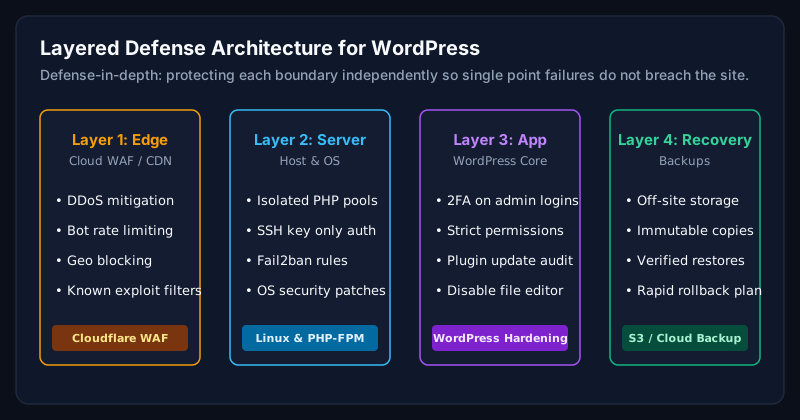
- Two-factor authentication for every admin and editor.
- Strong, unique passwords enforced via policy.
- Least-privilege roles. No default 'admin' username.
WAF & edge protection
- Cloudflare WAF with managed rules and OWASP rules enabled.
- Rate limiting on /wp-login.php, /xmlrpc.php, and REST endpoints.
- Bot Fight Mode + country-based rules where relevant.
Server & file hardening
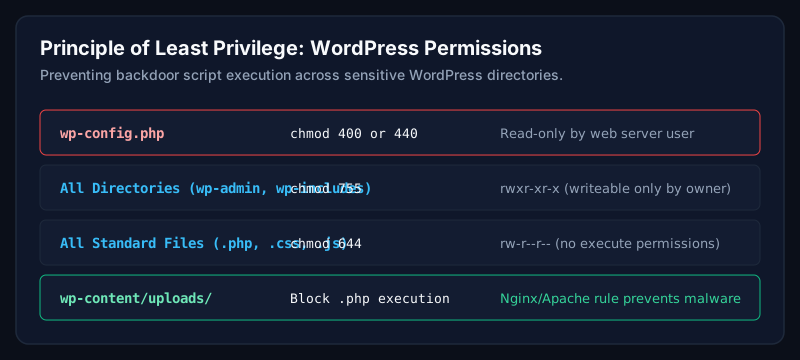
- Disable file editing in wp-config.php (DISALLOW_FILE_EDIT).
- Force HTTPS and HSTS at the edge and server.
- Restrict PHP execution in /uploads/ and other writeable directories.
Monitoring & backups
- File integrity monitoring (Wordfence, Sucuri, or MalCare).
- Off-site daily backups with retention of at least 30 days.
- Uptime monitoring with alerts to a channel you actually check.
Incident response
Every business site should have a written incident response plan: who is called first, where credentials live, and which backup to restore from. When a hack happens at 2am, checklists beat panic.
Common mistakes
- Relying on one plugin as the sole security layer.
- Ignoring plugin update warnings until something breaks.
- Storing production credentials in shared spreadsheets.
When should businesses hire an expert?
After the first incident, or before your site processes payments, personal data, or serves a regulated industry like healthcare or finance.
Frequently asked questions
Is WordPress secure by default?
The core is well maintained, but a default install with a random theme and 20 plugins is not secure. Hardening is required.
Do I need Cloudflare for WordPress security?
Cloudflare is the easiest way to add enterprise-grade WAF, DDoS protection, and rate limiting to any WordPress site, including on the free plan.
How often should I update WordPress?
Core, plugins, and themes should be updated monthly at minimum, with a staging site to catch regressions before they hit production.
Related Service
Need expert help with this?
Proactive security hardening, WAF configuration, malware prevention, and continuous monitoring.
Book a Free Website Audit
Not sure if your WordPress site is truly secure?
Book a free website audit. I will review your security posture and send back a prioritised hardening plan.
Book a Free Website AuditAuthor
Usman Shamas Jatoi
WordPress Performance Engineer · Technical SEO Consultant · Website Infrastructure Specialist
Usman Shamas Jatoi helps businesses across the US, UK, Canada and Australia build faster, safer, and higher-ranking WordPress websites. He specialises in Core Web Vitals, technical SEO, Cloudflare, WooCommerce performance, and long-term website maintenance.