Table of contents
What Core Web Vitals actually measure
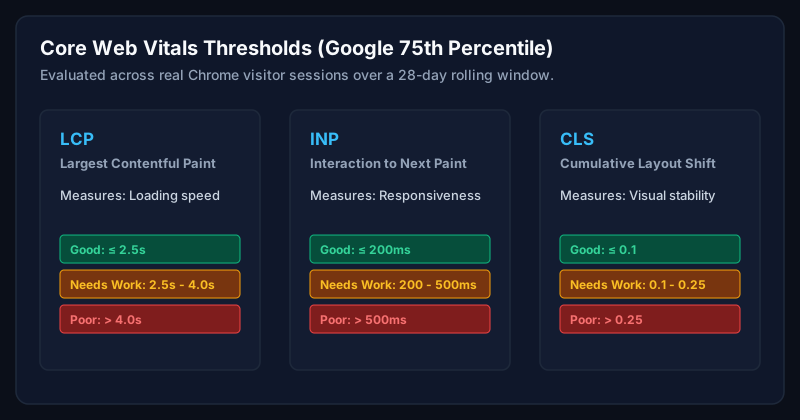
Core Web Vitals are three metrics Google uses to score real user experience on your website: Largest Contentful Paint (LCP) measures how quickly the main content becomes visible; Interaction to Next Paint (INP) measures how responsive the page feels when a user interacts with it; Cumulative Layout Shift (CLS) measures how visually stable the page is while loading.
Google evaluates these using field data collected from real Chrome users. The Chrome User Experience Report (CrUX). Lab tools like Lighthouse are useful for debugging, but only field data decides whether your URLs pass.
Why they matter for modern businesses
For businesses in the US, UK, Canada and Australia competing on paid ads, organic search, and email campaigns, Core Web Vitals directly influence three things: search rankings, conversion rates, and ad quality scores. On WooCommerce stores I have optimised, moving LCP under 2.5 seconds has consistently improved checkout completion by 8-25%.
Step 1: Audit with field data
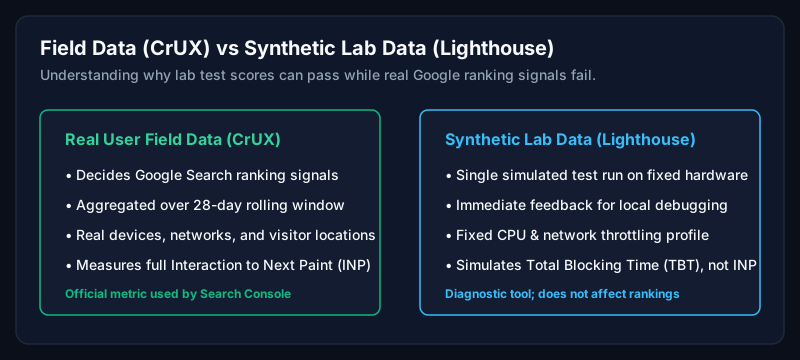
- Open Google Search Console → Experience → Core Web Vitals to see which URL groups are failing.
- Cross-check with PageSpeed Insights for a specific URL, read the 'Discover what your real users are experiencing' block first.
- Pull CrUX Vis or Treo for 28-day trends across mobile and desktop.
- Segment by template (homepage, category, product, blog). WordPress issues almost always concentrate by template.
Step 2: Fix LCP on WordPress
LCP is usually a hero image, hero heading, or above-the-fold background. On WordPress, the four highest-impact fixes are:
- Preload the LCP image with fetchpriority="high" and modern formats (AVIF/WebP).
- Serve responsive sizes via wp_get_attachment_image with proper srcset, never a single large file.
- Move render-blocking CSS/JS below the fold, and inline critical CSS for the hero.
- Use a properly configured CDN (Cloudflare is my default) so images and HTML are served from the visitor's continent.
Step 3: Fix INP on WordPress
INP replaced FID in 2024 and it is the metric most WordPress sites fail today. Long tasks from third-party scripts (chat widgets, heatmaps, marketing pixels) and heavy Elementor JavaScript are the usual culprits.
- Audit third-party scripts and defer everything non-critical.
- Break up long tasks in custom JavaScript using setTimeout, scheduler.yield, or requestIdleCallback.
- Reduce main-thread work from page builders by disabling unused widgets and animations.
- Serve modern JavaScript (ES2020+) and drop legacy polyfills where possible.
Step 4: Fix CLS on WordPress
- Always set width and height on images, videos, and iframes.
- Reserve space for ad units and embedded widgets.
- Load web fonts with font-display: swap and preload the primary font file.
- Avoid injecting content above existing content after load (banners, cookie notices).
Practical examples
Common LCP work includes improving image delivery, removing render-blocking resources, and reducing delays in the critical rendering path. Measure the same page under comparable conditions before and after each change.
INP investigations often start with heavy widgets, marketing scripts, and long-running custom JavaScript. Test changes against both lab diagnostics and real-user data where it is available.
Common mistakes
- Optimising only for Lighthouse scores instead of real user data.
- Installing five caching plugins that conflict with each other.
- Compressing images to unusable quality instead of adopting AVIF/WebP with correct sizes.
- Ignoring mobile. Most WordPress traffic across the US, UK, Canada and Australia is mobile-first.
Expert tips
- Fix per template, not per URL. Ninety percent of WordPress performance work is template-level.
- Ship changes behind a staging environment and measure with real users for 28 days before declaring victory.
- Automate a monthly Core Web Vitals report so regressions are caught in days, not quarters.
When should businesses hire an expert?
If your site earns revenue and your Core Web Vitals have been in the yellow or red for more than 60 days, hire an expert. Every month of failing vitals is measurable lost revenue on both organic and paid channels.
Frequently asked questions
What is a good LCP for WordPress?
Under 2.5 seconds on the 75th percentile of mobile users, measured with field data in Chrome User Experience Report.
Do Core Web Vitals affect SEO?
Yes. They are a confirmed Google ranking signal as part of the page experience system and they directly influence conversion.
Can Elementor sites pass Core Web Vitals?
Yes, but it takes disciplined engineering, lean widgets, deferred JavaScript, and a tuned CDN. Default Elementor installs rarely pass.
How long does Core Web Vitals optimisation take?
Most WordPress sites reach green on all three metrics within 2-6 weeks of focused work.
Related Service
Need expert help with this?
Professional field-data diagnosis and optimization for LCP, INP, and CLS on WordPress and WooCommerce sites.
Get a Website Speed Analysis
Not sure why your Core Web Vitals are failing?
Book a free website speed analysis and get a prioritised plan tailored to your WordPress site.
Get a Website Speed AnalysisAuthor
Usman Shamas Jatoi
WordPress Performance Engineer · Technical SEO Consultant · Website Infrastructure Specialist
Usman Shamas Jatoi helps businesses across the US, UK, Canada and Australia build faster, safer, and higher-ranking WordPress websites. He specialises in Core Web Vitals, technical SEO, Cloudflare, WooCommerce performance, and long-term website maintenance.