Table of contents
Last updated: 31 October 2026. This situation is still developing, so check php.net for the latest advisories.
The short version
- On 21 October 2026, the PHP project released emergency security updates for two critical flaws in the PHP engine itself, tracked as CVE-2026-109618 and CVE-2026-109619 and nicknamed PHP2Shell.
- WordPress, your plugins, and your theme are not the problem. The flaws are in PHP, the software your host uses to run WordPress, so a fully updated WordPress site on an unpatched server is still exposed.
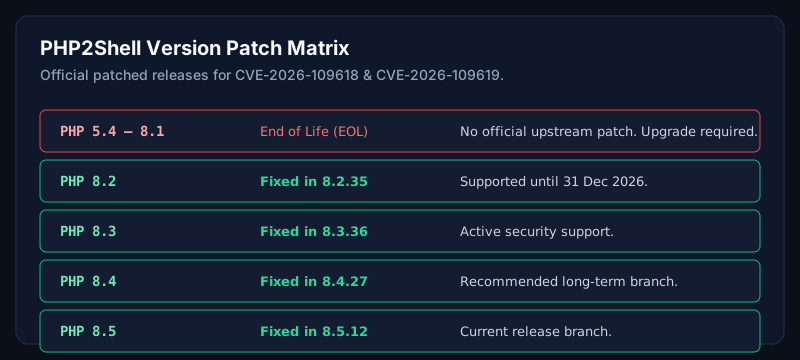
- The fix is to run a patched PHP release: 8.5.12, 8.4.27, 8.3.36, or 8.2.35, or a vendor build that includes the fix.
- A public exploit exists, and attack attempts were reported around the time of disclosure. This is not one to leave for next month.
What happened
Two security firms, Calif and Wiz, each used AI tools to find these flaws, and they coordinated with the PHP team and OpenAI before going public. Wiz reported its findings to PHP on 24 August, PHP confirmed them in September, and patched releases and public disclosure followed on 21 October.
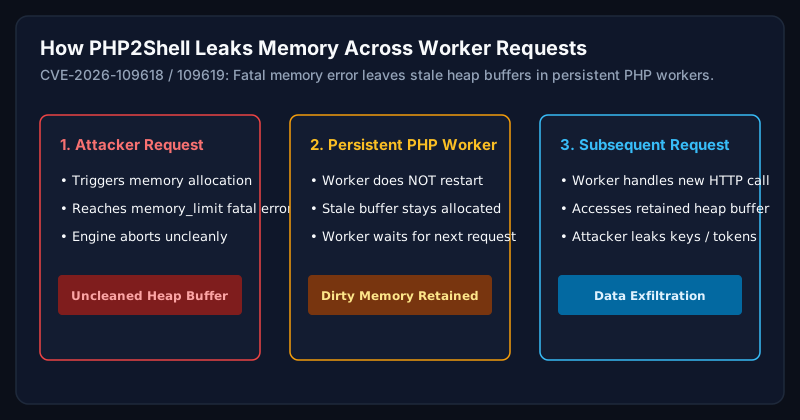
The bugs come from how PHP handles fatal errors, especially running out of memory. When a request dies in the wrong way, stale data can be left behind in memory, and a later request handled by the same PHP worker can pick it up. Depending on the bug, an attacker can read sensitive memory or corrupt it to run code. No login is needed.
How old is the flaw?
More than a decade. The affected code goes back many years, and the flaws affect PHP versions as far back as 5.4. Reports differ slightly on the exact age, so the safest description is "more than ten years." What changed recently was not the bug but how practical it became to exploit.
What AI actually changed
The flaws were hard to turn into working attacks. Exploiting them meant chaining several bugs together and adapting to how each server lays out memory, which is slow, specialist work. Wiz says AI models made this much faster, and that a single researcher did in about a week what would previously have taken a strong team months.
The practical lesson is that "too complicated to exploit" is a weaker defence than it used to be. The same tools help defenders find problems earlier, but they also help attackers adapt exploits quickly once a flaw becomes public.
Why it matters for WordPress
Wiz demonstrated unauthenticated code execution against default WordPress, Drupal, and Joomla installations. Those were demonstrations, not the limit: the flaw is in PHP, so even a very simple PHP page on an affected version can be vulnerable. Attackers who read server memory may also see passwords, tokens, and API keys belonging to other requests.
Is your site affected?
- Find your PHP version. In WordPress, go to Tools → Site Health → Info → Server. You can also check your hosting control panel, or ask your host.
- Compare it with the fixed versions: PHP 8.5 needs 8.5.12 or later, 8.4 needs 8.4.27, 8.3 needs 8.3.36, and 8.2 needs 8.2.35.
- Be careful with Linux hosting. Some providers apply security fixes to older-looking version numbers (a "backport"), so a lower number does not always mean unpatched. If you are unsure, ask your host to confirm in writing that CVE-2026-109618 and CVE-2026-109619 are fixed.
- Confirm PHP was restarted. Installing an update does not help until the running PHP workers use it.
If you run PHP 8.1 or older, the PHP project issues no patch. Plan an upgrade to a supported version after testing your plugins and theme on a staging copy, or ask your host for a vendor-supported patched build. PHP 8.2 reaches the end of its security support on 31 December 2026, so a newer branch is the better long-term choice.
What to do now, by hosting type
- Managed WordPress or shared hosting: Check your dashboard and contact your host. Ask which PHP version is running and whether the fix has been applied.
- VPS or dedicated server: Update your PHP packages, restart PHP-FPM or Apache, and confirm the running version afterwards.
- Docker or containers: Rebuild from a patched image and redeploy. Restarting the old image does not fix it.
- Behind Cloudflare or another WAF: Providers rolled out stopgap rules, which are a useful buffer, but they do not replace patching.
Temporary measures and their limits
Early advice suggested changing PHP settings, such as disabling session upload progress or raising memory limits. Guidance conflicted across sources, and at least one security firm later corrected its advice. Treat settings changes as a short-term buffer at best, and patch. PHP also published a further informational advisory on 23 October about a related session upload-progress issue (CVE-2026-115560). Check php.net for the current status.
If you think your site was exploited
Because the flaw sits below WordPress, your normal application logs may show very little. Warning signs include unexpected 500 errors or memory-limit errors, unusually large or odd session cookies in responses, unexplained PHP worker restarts, new or changed PHP files, unknown admin users, spam URLs, and unexpected redirects.
Patching closes the door but does not remove someone who is already inside. If you suspect a compromise, check for backdoors, rotate passwords and API keys, and restore from a clean backup. See my WordPress malware removal service, and for a deeper hardening baseline, read WordPress Security in 2026: The Baseline Every Business Site Needs.
What this means going forward
Slow patching is the real risk here. Sites that keep PHP, WordPress core, and plugins on a monitored update schedule, with tested staging updates and restore-ready backups, are in a far better position when something like this lands. That is the work behind WordPress maintenance, and hosting optimization covers PHP versions and server configuration. For wider protection, see WordPress security services.
Sources
- Wiz Research: PHP2Shell: AI uncovers critical RCE vulnerabilities — https://www.wiz.io/blog/php2shell-php-rce
- Axios: Black October: why bugs discovered by OpenAI tech are creating a cyber emergency — https://www.axios.com/2026/10/22/php-vulnerability-security-update-websites
- CNN: Websites shut down globally after AI finds cybersecurity flaw — https://www.cnn.com/2026/10/21/tech/php2shell-vulnerability-ai-intl
- Fortune: AI tools discovered the PHP vulnerability — https://fortune.com/2026/10/21/ai-tools-discovered-the-php-vulnerability-that-could-take-down-70-of-the-internet-now-the-race-is-on-to-patch-it-before-ai-powered-hackers-attack/
- NPR: AI found the flaw. Hackers found the leak — https://www.npr.org/2026/10/24/nx-s1-6012327/ai-found-the-flaw-hackers-found-the-leak-the-race-to-save-php2shell
- TuxCare: php2shell patches for PHP 5.2 through 8.1 — https://tuxcare.com/blog/php2shell-cve/
- Qualys: PHP security release advisory — https://blog.qualys.com/vulnerabilities-threat-research/2026/10/20/php-announces-critical-security-release-for-two-vulnerabilities
Frequently asked questions
Is WordPress itself vulnerable to PHP2Shell?
No. The flaws are in PHP, not in WordPress core, plugins, or themes. Updating WordPress does not fix them. Updating PHP does.
Will updating my plugins protect me?
Not from this. Keep plugins updated for other reasons, but the fix for PHP2Shell is a patched PHP release.
My host says they manage everything. Do I need to act?
Ask them for confirmation. Request the PHP version running on your site and whether the October 21 fixes are applied and the workers restarted.
Did AI really find this?
Both Calif and Wiz say they used AI tools. The bugs existed for years; AI helped find them and made it far easier to turn them into working exploits.
Does an unpatched server mean my site is hacked?
No, but it is exposed, and a public exploit exists. Patch first, then check for signs of compromise.
Can you review my site?
Yes. I can check your PHP version and hosting setup and look for signs of compromise. Request a security review.
Related Service
Need expert help with this?
Proactive security hardening, WAF configuration, PHP version upgrades, and vulnerability management.
WordPress Security Review
Need your WordPress server verified for PHP2Shell?
Request a security review to check your PHP version, hosting stack, and security posture against known exploits.
WordPress Security ReviewAuthor
Usman Shamas Jatoi
WordPress Performance Engineer · Technical SEO Consultant · Website Infrastructure Specialist
Usman Shamas Jatoi helps businesses across the US, UK, Canada and Australia build faster, safer, and higher-ranking WordPress websites. He specialises in Core Web Vitals, technical SEO, Cloudflare, WooCommerce performance, and long-term website maintenance.