Table of contents
Crawlability
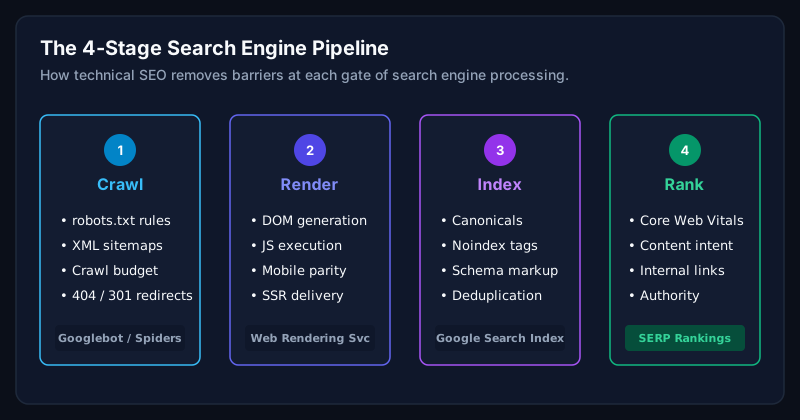
- Clean robots.txt, never block CSS, JS, or the sitemap.
- XML sitemap generated dynamically, split by post type when the site is large.
- Fix crawl waste: parameter URLs, tag pages, and empty archives.
Indexation
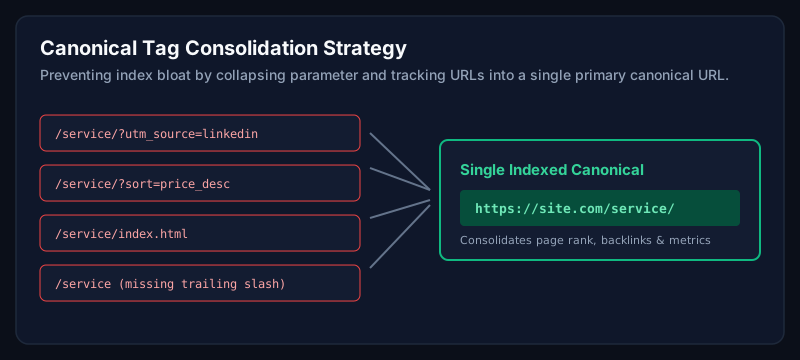
- Canonical tags on every template, self-referencing by default.
- Noindex thin templates (search results, empty taxonomies).
- Consolidate duplicate content with 301s and canonical hints.
Structured data
- Organization + Person schema in the site footer or root layout.
- Article schema on blog posts, Product on WooCommerce, FAQ where relevant.
- Breadcrumb schema on every non-home template.
Internal linking
Internal linking is the highest-leverage technical SEO lever most WordPress sites ignore. Every page should link to at least three deeper pages within its topic cluster.
Core Web Vitals
Passing Core Web Vitals is table stakes for competitive markets in the US, UK, Canada and Australia. See the Core Web Vitals guide for the full framework.
International SEO
- If you serve international markets, decide between subfolders (/uk/, /us/) or subdomains.
- Use hreflang tags consistently across every template.
- Localise currency, spelling, and phone numbers per market.
Common mistakes
- Blocking JavaScript in robots.txt.
- Leaving default WordPress tag archives indexable with no unique content.
- Adding schema through five plugins that conflict with each other.
When should businesses hire an expert?
When your content is not ranking despite quality and links, technical SEO is almost always the reason. A single audit often unlocks growth that stalled for months.
Frequently asked questions
Do I need Yoast or Rank Math for technical SEO?
Either works. Rank Math tends to include more schema types by default, but any well-configured SEO plugin is fine.
How often should I run a technical SEO audit?
For business-critical sites, a full audit every 6 months and a lightweight review every quarter.
Is Core Web Vitals part of technical SEO?
Yes. Page experience signals are part of Google's ranking systems and are a core part of any modern technical SEO engagement.
Related Service
Need expert help with this?
In-depth crawlability, schema architecture, and technical SEO fixes for WordPress & WooCommerce stores.
Schedule a Technical SEO Consultation
Ready to unlock the traffic your content deserves?
Schedule a technical SEO consultation and get a clear, prioritised roadmap for your WordPress site.
Schedule a Technical SEO ConsultationAuthor
Usman Shamas Jatoi
WordPress Performance Engineer · Technical SEO Consultant · Website Infrastructure Specialist
Usman Shamas Jatoi helps businesses across the US, UK, Canada and Australia build faster, safer, and higher-ranking WordPress websites. He specialises in Core Web Vitals, technical SEO, Cloudflare, WooCommerce performance, and long-term website maintenance.